Offers IFrame Integration Guide
Embed the Prime Earn Games & Offers wall directly into your app or website using an IFrame or WebView. This guide walks you through the full setup in six steps.Step 1 — Get Your URL
Your dedicated offers/games wall URL is:XXXXXXXX with your Publisher App ID and Test123 with your user’s unique identifier (see Step 3).
Need the combined wall (Surveys + Games)? Use
https://monetize.primeearn.com/featured?app=XXXXXXXX&uuid=Test123 instead.Step 2 — Implement in Your App or Website
Choose the integration method that fits your platform:WebView (Mobile Apps)
Load the URL inside a native WebView component. Make sure the WebView has:- JavaScript enabled
- DOM storage enabled
- Redirect/navigation handling so external links open in a browser
IFrame (Web)
New Browser Tab
If an IFrame is not suitable, open the URL in a new tab:Step 3 — Pass Parameters
Replace theuuid placeholder with a unique, stable identifier for the current user. This ties offer completions to the correct account.
Source & Network ID Reference
Pass the numeric
ID as the value for both source and network. Choose the row that best describes how the user arrived in your app.
Example with a real user ID:
Step 4 — Customize Design
The offers wall supports several design parameters you can append to the URL.
Example:
Step 5 — Handle Rewards via Postback
When a user completes an offer or game milestone, Prime Earn fires a server-to-server postback to your configured callback URL.Postback URL Format
Configure your callback URL in the dashboard. Prime Earn will substitute the placeholders at the time of the event:Postback Parameters
Games/Offers Event Types ({type})
Understanding Credit Delay 7
Credit Delay 7 ExplainedSome game offers operate on a 7-day credit delay:
- Immediately when the user completes the task, you receive a
PENDINGpostback (type=11). - After 7 days, one of the following is sent:
COMPLETED(type=7) — task was verified and credit is confirmed.RECONCILED(type=9) — transaction was reconciled. Thetx_idfor reconciled events will begin withR-.
COMPLETED (type=7) or RECONCILED (type=9) postback.The Earning Jar
The Earning Jar is a threshold mechanic built into the Prime Earn wall. A user must accumulate enough reward value across a campaign’s tasks to “fill” the jar before any rewards can be redeemed in your app. This feature is currently rolling out across campaigns and will eventually apply to all.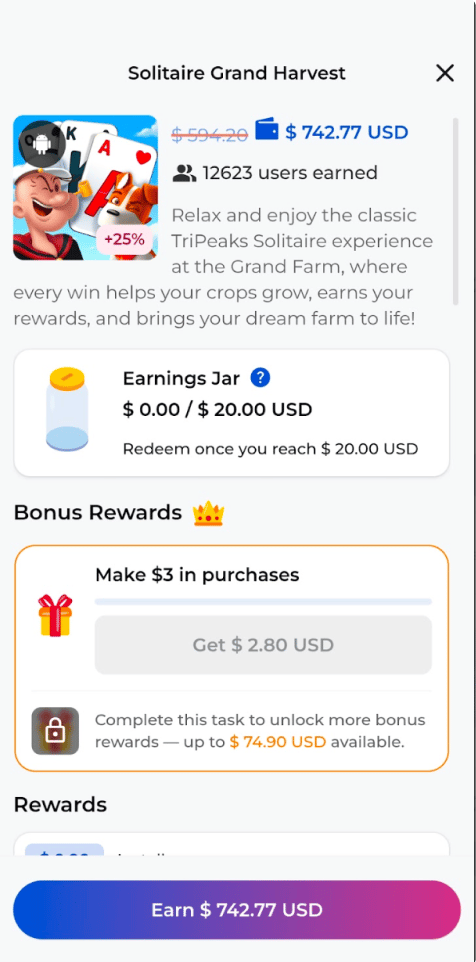
Scenario A — Jar fills normally (no Credit Delay 7)
Campaign requires 10,000 points to fill the jar.
The jar fills and the user can redeem immediately. You receive 3 separate postbacks, each with a unique
tx_id, one per task.
Scenario B — Jar held due to Credit Delay 7
Campaign requires 10,000 points to fill the jar, but one task exceeds the Credit Delay 7 threshold.
The jar fills, but the high-value task triggers Credit Delay 7 — so no rewards are released yet.
- User confirmed legitimate
- User confirmed fraudulent
Once our team verifies the user is not fraudulent, you receive all 3 postbacks at the same time, each with a unique
tx_id. Receiving multiple postbacks simultaneously is expected behavior in this scenario — treat them as normal confirmed postbacks and credit the user for each.Whitelisting IPs
Ensure your server accepts postback requests from these Prime Earn IPs:Step 6 — Go Live
Before enabling for all users, run through this checklist:- Replace
XXXXXXXXwith your real Publisher App ID - Replace
Test123/uuidwith your real user ID logic - Configure your postback URL in the Prime Earn dashboard
- Whitelist the Prime Earn IP addresses on your server
- Test a full offer completion in a staging environment and verify your postback receives the correct parameters
- Handle
PENDING(type=11) postbacks without immediately granting rewards - Verify deduplication logic using
{tx_id}, notingR-prefix for reconciled events