> ## Documentation Index
> Fetch the complete documentation index at: https://docs.primeearn.com/llms.txt
> Use this file to discover all available pages before exploring further.
# Offers IFrame Integration
> Embed the Prime Earn Games & Offers wall directly into your app or website using an IFrame or WebView. Step-by-step setup guide covering URL parameters, design customisation, postback handling, and go-live checklist.
# Offers IFrame Integration Guide
Embed the Prime Earn Games & Offers wall directly into your app or website using an IFrame or WebView. This guide walks you through the full setup in six steps.
***
## Step 1 — Get Your URL
Your dedicated offers/games wall URL is:
```
https://monetize.primeearn.com/offers?app=XXXXXXXX&uuid=Test123
```
Replace `XXXXXXXX` with your **Publisher App ID** and `Test123` with your **user's unique identifier** (see [Step 3](#step-3--pass-parameters)).
**Need the combined wall (Surveys + Games)?** Use `https://monetize.primeearn.com/featured?app=XXXXXXXX&uuid=Test123` instead.
***
## Step 2 — Implement in Your App or Website
Choose the integration method that fits your platform:
### WebView (Mobile Apps)
Load the URL inside a native WebView component. Make sure the WebView has:
* JavaScript enabled
* DOM storage enabled
* Redirect/navigation handling so external links open in a browser
### IFrame (Web)
```html theme={null}
```
### New Browser Tab
If an IFrame is not suitable, open the URL in a new tab:
```js theme={null}
window.open(
'https://monetize.primeearn.com/offers?app=XXXXXXXX&uuid=Test123',
'_blank',
'noopener,noreferrer'
);
```
***
## Step 3 — Pass Parameters
Replace the `uuid` placeholder with a **unique, stable identifier** for the current user. This ties offer completions to the correct account.
| Parameter | Required | Description |
| ----------- | ------------ | ---------------------------------------------------------------------------------------------------------------------------------------- |
| `app` | Yes | Your Publisher App ID (provided in your dashboard) |
| `uuid` | Yes | A unique, persistent ID for the end user |
| `maid` | If available | Mobile Advertising ID — IDFA on iOS or GAID on Android. Must be provided when available; significantly improves performance. |
| `age` | No | User age for offer targeting (`0–150`). |
| `birthday` | No | Date of birth in `YYYY-MM-DD` format. Preferred over `age` when both are available. |
| `gender` | No | User gender: `m` (Male) or `f` (Female). |
| `zip` | No | Postal / ZIP code for geo-targeted offer matching. |
| `locale` | No | Interface language. Pass `en` or `en-US` to set the wall language to English. Currently only English is supported. |
| `source` | No | Numeric traffic source ID. Use the ID from the lookup table below. |
| `network` | No | Numeric network ID. Use the ID from the lookup table below. |
| `placement` | No | Describes where in your app the wall is embedded (e.g. `post_level`, `main_menu`). Helps compare performance across multiple placements. |
**Age vs. birthday:** If you have both, prefer passing `birthday` — it is more precise and provides better targeting than `age` alone.
**Source & Network ID Reference**
Pass the numeric `ID` as the value for both `source` and `network`. Choose the row that best describes how the user arrived in your app.
| ID | Network | Source type |
| -- | ------------------------ | --------------- |
| 1 | Google | Paid UA |
| 2 | Facebook | Paid UA |
| 3 | Instagram | Paid UA |
| 4 | Organic Google | Organic |
| 5 | Unknown | Other |
| 6 | Other | Other |
| 7 | Referral / Tell a friend | Organic |
| 8 | Apple Search Ads | Paid UA |
| 9 | TikTok Ads | Paid UA |
| 10 | Bidease | Paid UA |
| 11 | Mintegral | Paid UA |
| 12 | AppLovin | Paid UA |
| 13 | iOS organic | Organic |
| 14 | IronSource / Unity Ads | Paid UA |
| 15 | Moloco | Paid UA |
| 16 | Liftoff | Paid UA |
| 17 | Vungle | Paid UA |
| 18 | Email | Organic / Owned |
| 19 | Push notification | Organic / Owned |
**Example with a real user ID:**
```
https://monetize.primeearn.com/offers?app=myApp1234&uuid=user_abc_987
```
Never reuse `uuid` values across different users. Each user must have a stable, unique ID to ensure rewards are attributed correctly.
***
## Step 4 — Customize Design
The offers wall supports several design parameters you can append to the URL.
| Parameter | Values | Description |
| --------- | ------------------------ | -------------------------------- |
| `theme` | `light` / `dark` | Sets the color scheme |
| `color` | Hex code (e.g. `3498db`) | Primary accent color (no `#`) |
| `logo` | URL-encoded image URL | Your brand logo displayed at top |
**Example:**
```
https://monetize.primeearn.com/offers?app=XXXXXXXX&uuid=Test123&theme=dark&color=3498db
```
Match the `theme` parameter to your app's current color mode for a seamless user experience.
***
## Step 5 — Handle Rewards via Postback
When a user completes an offer or game milestone, Prime Earn fires a **server-to-server postback** to your configured callback URL.
### Postback URL Format
Configure your callback URL in the dashboard. Prime Earn will substitute the placeholders at the time of the event:
```
https://your-server.com/reward?user={user_id}&amount={reward}&type={type}&tx={tx_id}
```
### Postback Parameters
| Parameter | Type | Description |
| ---------- | ------------- | ---------------------------------------------- |
| `{reward}` | Integer | Amount of in-app currency to award to the user |
| `{payout}` | Integer/Float | Publisher payout in USD |
| `{type}` | Integer | Event type (see table below) |
| `{user}` | String | The unique user ID you passed as `uuid` |
| `{tx_id}` | String | Unique transaction ID for deduplication |
### Games/Offers Event Types (`{type}`)
| Value | Event | Description |
| ----- | --------------- | ------------------------------------------------------------------------------------------------ |
| `3` | Bonus / Support | Reward issued via a bonus promotion or by customer support. Credit immediately — never reversed. |
| `7` | Completed | Offer/game task fully completed and credited |
| `9` | Reconciled | Transaction reconciled after review. `tx_id` starts with `R-` |
| `11` | Pending | Initial postback during a Credit Delay 7 offer |
### Understanding Credit Delay 7
**Credit Delay 7 Explained**
Some game offers operate on a **7-day credit delay**:
1. **Immediately** when the user completes the task, you receive a `PENDING` postback (`type=11`).
2. **After 7 days**, one of the following is sent:
* `COMPLETED` (`type=7`) — task was verified and credit is confirmed.
* `RECONCILED` (`type=9`) — transaction was reconciled. The `tx_id` for reconciled events will begin with `R-`.
Do **not** grant the reward to the user until you receive the `COMPLETED` (`type=7`) or `RECONCILED` (`type=9`) postback.
### The Earning Jar
The **Earning Jar** is a threshold mechanic built into the Prime Earn wall. A user must accumulate enough reward value across a campaign's tasks to "fill" the jar before any rewards can be redeemed in your app. This feature is currently rolling out across campaigns and will eventually apply to all.
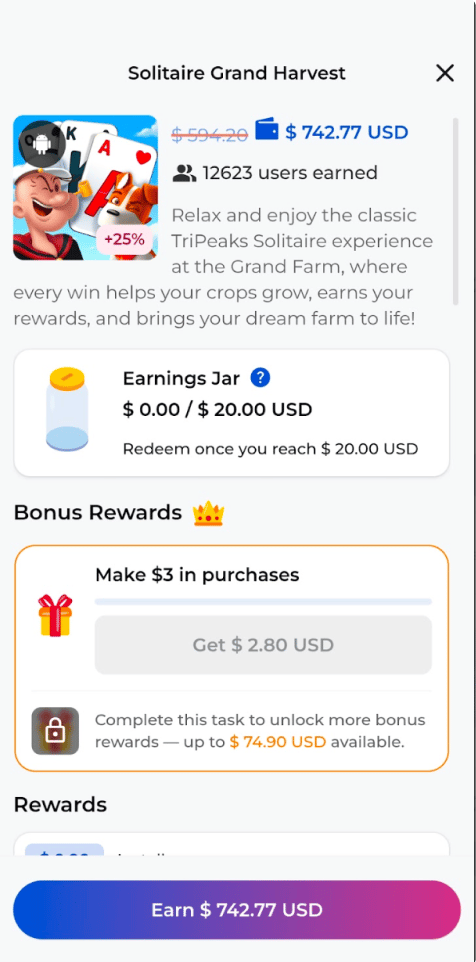 If all reward events in a campaign fall **below** the Credit Delay 7 threshold, the jar fills and rewards are released immediately. If **any** single reward exceeds that threshold, the entire jar is held until our team confirms the user is not fraudulent.
#### Scenario A — Jar fills normally (no Credit Delay 7)
> Campaign requires 10,000 points to fill the jar.
| Task | Points | Value |
| ------- | --------- | ----- |
| Level 1 | 2,000 pts | \$2 |
| Level 2 | 3,000 pts | \$3 |
| Level 3 | 5,000 pts | \$5 |
The jar fills and the user can redeem immediately. You receive **3 separate postbacks**, each with a unique `tx_id`, one per task.
#### Scenario B — Jar held due to Credit Delay 7
> Campaign requires 10,000 points to fill the jar, but one task exceeds the Credit Delay 7 threshold.
| Task | Points | Value |
| -------- | ---------- | -------------------- |
| Level 1 | 2,000 pts | \$2 |
| Level 2 | 3,000 pts | \$3 |
| Level 10 | 10,000 pts | \$10 ← triggers hold |
The jar fills, but the high-value task triggers Credit Delay 7 — so **no rewards are released yet**.
Once our team verifies the user is not fraudulent, you receive **all 3 postbacks at the same time**, each with a unique `tx_id`. Receiving multiple postbacks simultaneously is expected behavior in this scenario — treat them as normal confirmed postbacks and credit the user for each.
The user is banned. **No postbacks are sent.** Do not credit the user.
In Scenario B, do not credit the user for any of the tasks until you receive the simultaneous batch of postbacks. The delayed delivery is intentional and confirms all rewards passed fraud review.
### Whitelisting IPs
Ensure your server accepts postback requests from these Prime Earn IPs:
```
168.119.57.82
49.12.33.196
49.13.14.251
```
Reject any postback requests that do **not** originate from these IPs to prevent reward fraud.
***
## Step 6 — Go Live
Before enabling for all users, run through this checklist:
* [ ] Replace `XXXXXXXX` with your real Publisher App ID
* [ ] Replace `Test123` / `uuid` with your real user ID logic
* [ ] Configure your postback URL in the Prime Earn dashboard
* [ ] Whitelist the Prime Earn IP addresses on your server
* [ ] Test a full offer completion in a staging environment and verify your postback receives the correct parameters
* [ ] Handle `PENDING` (type=11) postbacks without immediately granting rewards
* [ ] Verify deduplication logic using `{tx_id}`, noting `R-` prefix for reconciled events
Once all checks pass, deploy and start earning!
If all reward events in a campaign fall **below** the Credit Delay 7 threshold, the jar fills and rewards are released immediately. If **any** single reward exceeds that threshold, the entire jar is held until our team confirms the user is not fraudulent.
#### Scenario A — Jar fills normally (no Credit Delay 7)
> Campaign requires 10,000 points to fill the jar.
| Task | Points | Value |
| ------- | --------- | ----- |
| Level 1 | 2,000 pts | \$2 |
| Level 2 | 3,000 pts | \$3 |
| Level 3 | 5,000 pts | \$5 |
The jar fills and the user can redeem immediately. You receive **3 separate postbacks**, each with a unique `tx_id`, one per task.
#### Scenario B — Jar held due to Credit Delay 7
> Campaign requires 10,000 points to fill the jar, but one task exceeds the Credit Delay 7 threshold.
| Task | Points | Value |
| -------- | ---------- | -------------------- |
| Level 1 | 2,000 pts | \$2 |
| Level 2 | 3,000 pts | \$3 |
| Level 10 | 10,000 pts | \$10 ← triggers hold |
The jar fills, but the high-value task triggers Credit Delay 7 — so **no rewards are released yet**.
Once our team verifies the user is not fraudulent, you receive **all 3 postbacks at the same time**, each with a unique `tx_id`. Receiving multiple postbacks simultaneously is expected behavior in this scenario — treat them as normal confirmed postbacks and credit the user for each.
The user is banned. **No postbacks are sent.** Do not credit the user.
In Scenario B, do not credit the user for any of the tasks until you receive the simultaneous batch of postbacks. The delayed delivery is intentional and confirms all rewards passed fraud review.
### Whitelisting IPs
Ensure your server accepts postback requests from these Prime Earn IPs:
```
168.119.57.82
49.12.33.196
49.13.14.251
```
Reject any postback requests that do **not** originate from these IPs to prevent reward fraud.
***
## Step 6 — Go Live
Before enabling for all users, run through this checklist:
* [ ] Replace `XXXXXXXX` with your real Publisher App ID
* [ ] Replace `Test123` / `uuid` with your real user ID logic
* [ ] Configure your postback URL in the Prime Earn dashboard
* [ ] Whitelist the Prime Earn IP addresses on your server
* [ ] Test a full offer completion in a staging environment and verify your postback receives the correct parameters
* [ ] Handle `PENDING` (type=11) postbacks without immediately granting rewards
* [ ] Verify deduplication logic using `{tx_id}`, noting `R-` prefix for reconciled events
Once all checks pass, deploy and start earning!